
Pixel-Pattern Review: The Free Tool That Turns Any Photo into a Perler Bead Pattern

Have you ever wished you could turn your favorite photo—whether it's your pet, a family memory, or a travel snapshot—into a Perler bead masterpiece? For years, that dream required hours of manual grid drawing, color matching, and guesswork.
Not anymore. Pixel-Pattern (pixel-pattern.com) is a completely free, browser-based tool that does all the hard work for you. Upload any image, and within seconds you get a pixel-perfect Perler bead pattern ready to print and fuse.
But Pixel-Pattern is more than just a pattern generator. It's also a thriving community where thousands of crafters share their own designs and access free tutorials. Whether you're a beginner picking up a pegboard for the first time or an experienced artist looking for inspiration, this platform has something for you.
In this guide, I'll walk you through everything Pixel-Pattern offers, how to use it step by step, and why it's become my go-to tool for all things Perler beads.
What Is Pixel-Pattern?
Pixel-Pattern is a free online tool designed specifically for fuse bead artists. Unlike generic pixel art converters, Pixel-Pattern is built with Perler, Hama, Artkal, and other fuse bead brands in mind.
The core function is simple: upload an image, and the tool automatically converts it into a grid-based pattern with color suggestions based on real bead colors. You can then adjust the size, tweak colors, and download the pattern as a printable PDF.
But what sets Pixel-Pattern apart from other pattern generators is its dual focus on tools and community. The website has three main sections:
- Pattern Generator – Turn any image into a bead pattern.
- Community Gallery – Browse patterns shared by other users.
- Blog – Free tutorials, ironing tips, and project ideas.
Best of all, it's 100% free. No watermarks, no paywalls, no "premium" features locked behind a subscription. Just a clean, fast, and generous tool for the Perler bead community.
How to Use Pixel-Pattern: Step-by-Step
Using Pixel-Pattern is incredibly straightforward. Here's how to create your first pattern in under five minutes.
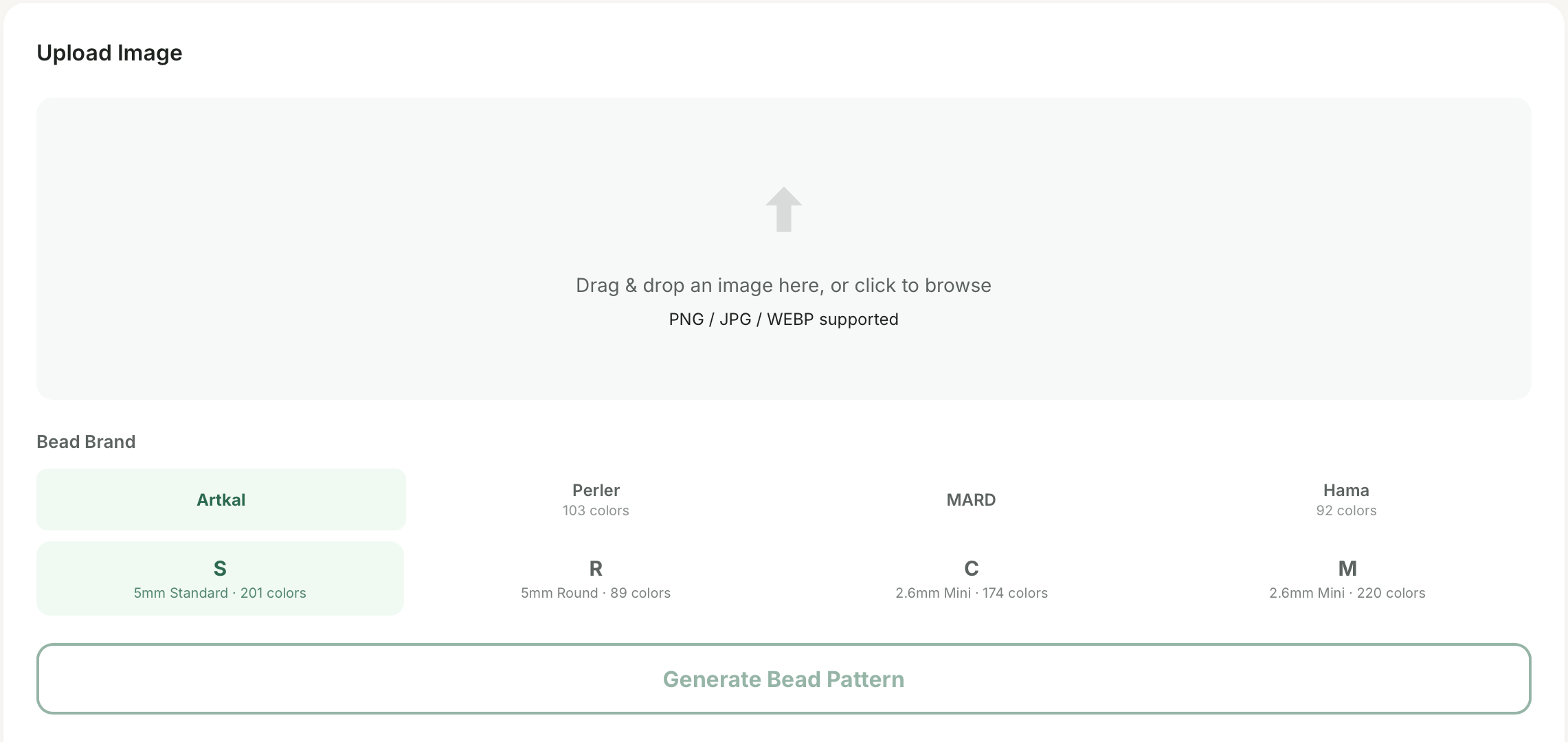
Step 1: Go to the Pattern Generator
Navigate to pixel-pattern.com and click on "Generator" in the top menu. You'll see a clean interface with an upload area.
Step 2: Upload Your Image
Click the upload button and select any image from your computer. Pixel-Pattern accepts JPG, PNG, and even GIF files. The tool works best with high-contrast, simple images, but feel free to experiment.
Step 3: Adjust Settings
Once uploaded, you'll see several customization options:
- Width & Height – Set the size of your pattern in beads (e.g., 29x29 for a small project, 50x50 for a larger one). The tool automatically maintains the aspect ratio.
- Colors – Choose which bead brand you're using (Perler, Hama, Artkal, or a custom palette). The generator will match your image to the closest available bead colors.
Step 4: Preview and Edit
The tool shows you a pixelated preview of what your finished pattern will look like. You can click on individual pixels to change their color manually if you want to make small tweaks.
Step 5: Download
Happy with the result? Click "Download". You'll get a printable document that includes:
- The full-color pattern grid
- A numbered color key
- A list of required beads by color
That's it! Print it out, grab your pegboard, and start beading.
The Community Gallery: Many Free Patterns
One of Pixel-Pattern's best features is the Community Gallery. You don't have to create every pattern from scratch—thousands of users have already done the work and shared their designs.
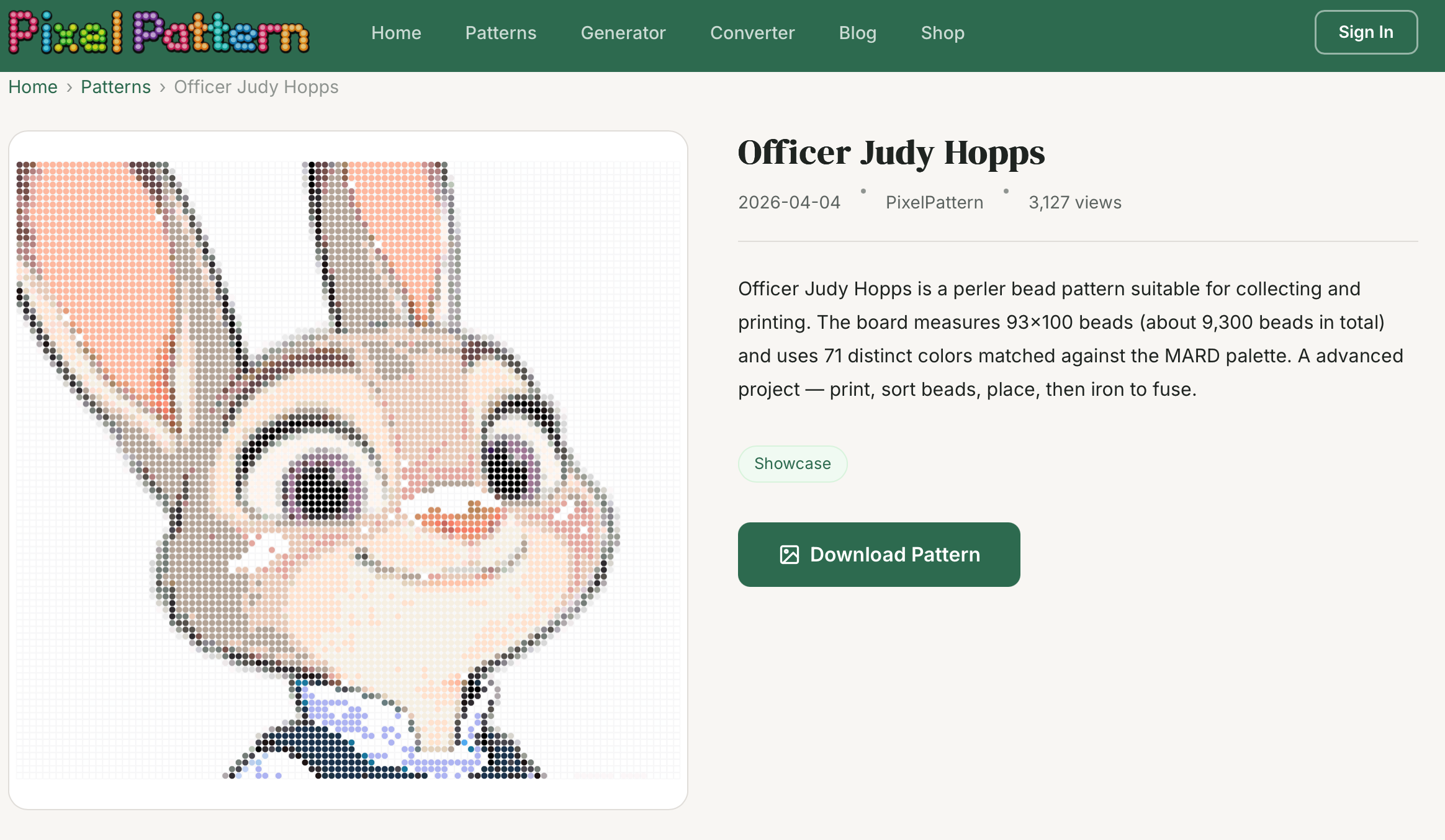
Each pattern listing shows:
- A preview image
- Grid dimensions
- Color palette used
- Download link for the PDF
All patterns are completely free to download and use for personal projects. The gallery is also a great place to find inspiration. See what others are making, then customize their patterns with your own color choices or modifications.
The Blog: Tutorials for Every Skill Level

Pixel-Pattern's blog is a hidden gem. While many pattern generators abandon their educational content, Pixel-Pattern regularly publishes high-quality tutorials written by experienced crafters.
Recent blog posts include:
- "How to Iron Perler Beads Without Holes (Complete Guide)"
- "3D Perler Beads for Beginners: From Cube to Castle"
- "The Tape Method: How to Make Large-Scale Fuse Bead Art"
- "Perler Bead Storage Ideas That Actually Work"
- "Best Perler Bead Tools for Faster, Easier Crafting"
Each post includes clear step-by-step instructions, photos, and links to relevant patterns in the gallery. The blog is completely free and doesn't require an account to read.
If you're new to Perler beads, start with their "Beginner's Guide" series. If you're already experienced, check out their advanced techniques for curved surfaces, hinges, and 3D structures.
Why Pixel-Pattern Beats Other Pattern Generators
There are several pattern generators online, so why choose Pixel-Pattern? Here's a quick comparison.
| Feature | Pixel-Pattern | Competitors |
|---|---|---|
| Free (no watermarks) | ✅ Yes | ❌ Often limited |
| Community gallery | ✅ Yes | ❌ Rare |
| Tutorial blog | ✅ Yes | ❌ No |
| PDF downloads | ✅ Yes | ⚠️ Sometimes paid |
| Color palettes for Perler/Hama/Artkal | ✅ Yes | ⚠️ Limited |
Pixel-Pattern also loads fast, works on any device (desktop, tablet, or phone), and doesn't bombard you with ads. It's a passion project built by a crafter for crafters, and it shows.
Tips for Getting the Best Results
To get the most out of Pixel-Pattern, keep these tips in mind.
- Use simple images with clear outlines. Photos with too much detail (like a crowded landscape) won't convert as cleanly as a cartoon character or a pet portrait with high contrast.
- Start small. For your first few patterns, use a grid size of 29x29 or smaller. Large patterns (100x100+) take many hours to bead and are best left to advanced projects.
- Trust the color suggestions but tweak if needed. The automatic color matching is excellent, but sometimes swapping a color for a different shade can make the design pop more.
- Check the community gallery before creating. Someone might have already made the pattern you need. Why reinvent the wheel?
- Bookmark patterns you love. If you're not signed in, just save the PDF to your computer. The gallery doesn't require an account, so you can download freely.
Who Is Pixel-Pattern For?
Pixel-Pattern is useful for almost anyone who works with fuse beads.
- Beginners – Skip the frustration of designing your own patterns. Start with simple community designs and learn the basics.
- Parents and teachers – Need quick crafts for kids? Generate patterns from coloring book pages or cartoon characters in seconds.
- Experienced artists – Push your skills with large-scale, multi-board projects. Use the generator to plan complex designs that would be impossible to draw by hand.
- Group coordinators – Running a craft night or summer camp? Generate matching patterns for everyone in minutes.
Final Verdict
Pixel-Pattern has quickly become one of my most-recommended tools for the fuse bead community. It's rare to find a free tool that is simultaneously powerful, easy to use, and genuinely generous with its features.
The pattern generator alone would be worth recommending. But when you add the community gallery (thousands of free patterns) and the tutorial blog (quality content that keeps growing), Pixel-Pattern becomes an essential resource for any Perler bead artist.
Is it perfect? No tool is. Very complex images can still require manual tweaking. And the gallery, while large, depends on users to keep contributing. But for 99% of use cases, Pixel-Pattern delivers exactly what you need—quickly and for free.
Try it for yourself: pixel-pattern.com